Colour Your Worlde

Artisan Colour

Showing posts with label router cutter. Show all posts
Scott Price of Innerhand Shaping completed a professional design and installation of 7 large format pieces for San Diego Sports Medicine. Their main lobby and gym at the new facility were enhanced with images of local San Diego landmarks and athletes by local photographers. The images where a mix of a direct to print on Sintra and high quality FujiFlex paper face mounted to acrylic. The large images were 6ft x 4ft and spectacular with their resolution, color and presentation. They truly transformed an empty large space into a fascinating, inviting and unique one with positive energy! The focal piece is the image of San Diego beachfront with breaking waves. The FujiFlex paper give amazing depth and aliveness to the image, and the effects of the plexiglas mounting add a watery shine that makes you feel as if you are actually there. It is amazing how well these images can represent your business and convey what you are trying to say.

We also worked with Scott to create an oval shaped image for a unique presentation. The image was printed direct on to Sintra and cut to shape with our digital router. The oval outline shape on the group of cyclists training together gives the image motion, and a truly thinking outside the box presentation. The ability to create and deliver images of different sizes, shapes and materials gives Innerhand Shaping the professional tools to deliver on artistic vision.

Innerhand Shaping does commercial and home art design and installation, using personal, local, stock or Scott's own abstract digital images. Also check out Innerhand's abstract fine art web gallery.
Our Zund G3 digital router can do some amazing things. It is able to cut through a variety of materials, from BioBoard to even leather. Of course, the best results are achieved when the print and cut files are set up correctly. It does take a little knowledge of Illustrator to do it right. This step by step guide shows the best way to set up a file for printing and cutting.

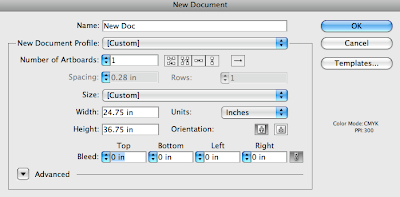
First create a new document in Illustrator. Make sure the document size is large enough to fit the graphic plus registration marks outside of the image. (Registration marks are required for the camera guide on the digital router to line up the artwork and cut file properly.)

Next create three layers in the new document. One for the RegMarks (Registration Marks), one for the ThroughCut (or KissCut if that is what is called for in the project), and one for the graphic or Artwork. Each layer should be named appropriately.

Place your graphic in the Artwork layer. Make sure the artwork is inside the document's
bounding box.
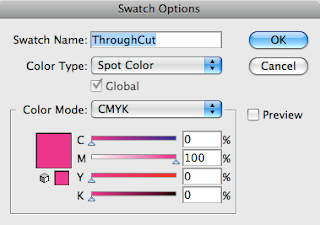
On your cut layer create lines and shapes that will go around the artwork. Be sure that proper bleed is built in your graphic and the cut lines are inset at least 1/4" from the outside of your artwork. Create a new swatch named ThroughCut set to Spot Color CMYK and 100% magenta. We recommend making the fill or stroke of the line .5 pt in thickness.
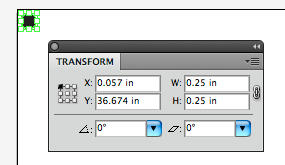
For the Registration Marks layer create .25" black circles. Place reg marks outside the graphic, but inside the bounding box of the document.
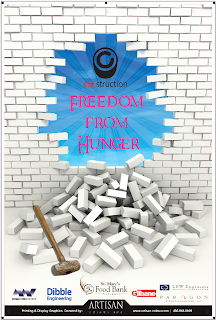
Be sure to check for any stray points or lines in the file that would effect your final cut.

When you are ready to save, save two versions of the file. To create the print file, turn off the Cut Path layer and leave the Artwork and Registration Marks layers turned on. Save this file as a pdf or eps. To create the cut file, turn off the Artwork layer and make sure the Registration Marks and Cut Path layers are turned on. Save this file as a native Illustrator ai file.

Master these steps, and you will be able to add custom cut elements to your design projects.
We were honored and flattered when Gretchen Peck from Digital Output contacted us to give our perspective in the technological advances that have helped shape our industry and business practices for her four part exclusive online series. Gretchen contacted us as we were in the middle of our merger with Artisan Colour to become their Display Graphics Division. The equipment and technology mentioned in the article are what have become the cornerstone of our new space in the Artisan Colour complex. Here is a portion of her article.

Mighty Imaging; AZ-based Shop Makes the Move to Automation -Gretchen A. Peck for Digital Output online

Mighty Imaging invested in a blend of print technologies in order to manage an array of large format graphics.

"Right now, the equipment line-up is the Océ LightJet for fine art and photographic applications, an Epson Stylus Pro 9800 for giclée output, and a Océ Arizona 350 GT UV flatbed for direct to substrate application," explains Fradin. "While the LightJet is our workhorse, the 350 GT is going to eclipse that rather quickly."

Corporate wall art is a strong market segment for Mighty Imaging. "We produce a fair amount of wallpaper for restaurants and bars, in addition to large prints and fabric graphics for lobbies, conference rooms, board rooms, and call centers. Our attention to detail and ability to manage color allows us to fill the fine art reproduction niche as well," he explains.

With growing volumes and a demanding customer base, it wasn’t enough to simply provide exceptional print. In addition, Mighty Imaging needed to offer sophisticated and stealthy finishing services. Thus, the company recently ordered its first digital cutting solution, a Zünd G3 digital cutter.

"Prior to the G3 I lived in the last century in regards to a cutting solution—panel saw, table saw, and hand cutting. The cost savings in labor and turnaround time should be significant, and of course, having every step in the workflow process under one roof is every print service provider’s goal," admits Fradin.

Fradin expects the G3 to eliminate bottlenecks in finishing by automating cutting and trimming. "Cutting by hand, with its inherent labor costs, potential for human error, and lack of efficiency, should be reduced to nearly zero," he says. "More importantly, unique applications will allow us to set our customers’ display graphics apart from others."